I'm on a Middle Earth kick if you haven't noticed. So it was only a matter of time before I logged into Lord of the Rings Online. It's been over a year since I've played the game. After playing so many console games and then Guild Wars 2, Lord of the Rings Online certainly shows its age.

But it's still a pretty game and coming back to it is like riding a bike. It took a few moments and then was almost like I never left. That is, if you ignore the occasional button pushes work in Guild Wars 2 but not Lord of the Rings Online and leave me temporarily confused.

So today was a good day. One in which I get to run around as a hobbit. And today, as you can see, I was a hobbit ridding a goat through the halls of Moria. That's not bad, as far as I'm concerned.

Had lunch with some co-workers today at Bartertown GR. It's a vegan/vegetarian/raw restaurant that has an interesting hipster vibe to it.

The food was good, despite my not being a huge vegetable lover. The lentil chili was especially impressive. Since they have a revolving list of specials they'll always have something interesting on the menu.

I was impressed that their cash register was essentially a drawer in a table coupled with a iPad/Square combo for credit cards. That Square device is popping up everywhere and it's kind of awesome.

With The Hobbit coming out this week I thought it would be a perfect time to re-watch the Lord of the Rings trilogy.

The movies are so long (it doesn't help that I have the extended versions) that it's going to take us several days of watching hobbit adventures before we are done.

Back in October I received the two OpenSourceRF wireless arduino shield from the kickstarter I backed. I've poked around with them on and off but I haven't had a whole lot of success. Admittedly, I haven't really tried hard either. So today I settled in to try and get the two devices communicating.

First I started with two arduinos wired directly to one another. Once I could confirm the sketch for that worked, I slapped the shields on and tested them wired. Success.

So I pulled the wires out of the Rx and Tx ports on the arduinos and tested to see if the boards would still communicate. That's when I hit a snag.

I read the manual for the wireless shields and played around with some of the settings. After playing around a little I discovered the shields would communicate as long as the Serial Mode (SW4) Bank 1 switch was on. After that the devices were talking.

Of course the next snag I hit was that the receive arduino didn't understand what the send arduino was saying, just that it was saying something. Still, that's progress. I'l have to read up on serial communication to learn how to pass usable data between the devices.

I used an example from here, although I wired up a photoresistor instead of a potentiometer.
image layout designed in Fritzing & OpenSourceRF shield image taken from here

As you can see in the above photo, wiring the two arduinos is easy. Once everything is wired up, simply set the Serial Mode (SW4) Bank 1 switch (it's the top switch in the orange box) to ON. After that you should see the RF DIN and RFDOUT LEDs blink.

Here are the basic sketches I used.

Send Sketch

//Sending Arduino Code
int analogValue5;

void setup() {
// Serial port enable
Serial.begin(19200);
}
void loop() {
// read analog pin 5
analogValue5 = analogRead(5);

int val=analogRead(analogValue5);
Serial.println(val);
delay(100);
}

Receive Sketch

// Receiving Arduino Code
byte incomingByte;

void setup() {
Serial.begin(19200);
pinMode (11, OUTPUT); //set pin 11 to output - this is for the LED
}

void loop() {
// check if there are any bytes available across the serial port
if (Serial.available()) {
// set the values to the ‘incomingByte’ variable
incomingByte = Serial.read();
// write the value to the pin 11
analogWrite(11, int(incomingByte));
Serial.print(incomingByte);
 }
}

Now the next step is to get a temperature sensor wired up and sending the proper information over RF. 

So here's one of those times where I read a pattern, figure I don't need a gauge swatch, and start knitting away. It's just a scarf, right? Exact measurements aren't important.

Except when your pattern takes exactly two skeins of yarn and that's all you have.

I realized after I was a quarter of the way done that I was knitting just under a 3/4 of an inch for every inch I should be knitting. That doesn't seem like much, but that means I'm either knitting a very short scarf or I don't have nearly enough yarn. Since I don't want a super short scarf, I ordered two more skeins of yarn (although I should only need one more) and they arrived today. They're from a different dye lot but close enough that I don't think anyone will notice.

One skein got me to almost a third of the length I want. So I've started on the second skein and I'm just over a third now, as you can see.

At this rate it's going to be very fat in the middle. Hopefully with the super tight knitting I apparently do it will be warm.

Next time I make this I'll have to try larger needles to compensate for how tight I knit.


It's been awhile since I've read The Hobbit so I thought I'd re-read it before the movie release later this month. The Hobbit was always my favorite of all of the books. That's probably because I remember watching the 70's animated The Hobbit more than any of the Lord of the Rings animated films. I loved that cartoon. Who doesn't think talking spiders are awesome?

I dont use facetime a lot, but when I do it's usually to harass one of my parents.

I'm making progress on the Shizuku scarf I started a week ago. I'm enjoying the pattern a lot more than the scarf I made for Chris, but I'm not so keen on the how the color is turning out. It's a little lighter than I would have liked.

I suppose I'll see what it looks like once I get into more of the blue and purple in the rest of the first skein and into the second one I'll need to use shortly. Maybe it will look nicer against a black jacket.

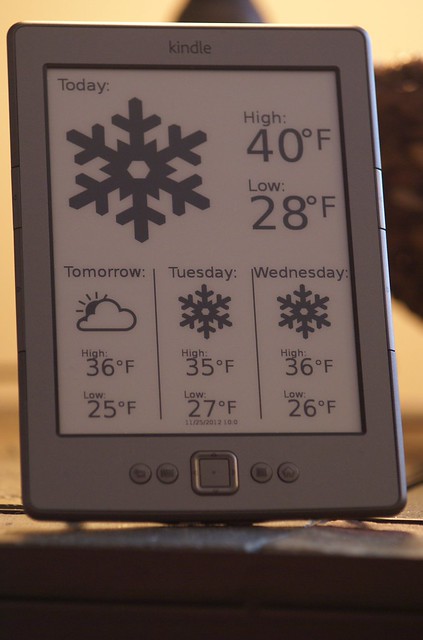
Up until now, the Kindle Weather Display has looked like the above with the forecast as:
Today
Tomorrow
next day (day of the week)
day after that (day of the week)

This works wonderfully until you hit about 7pm. At 7pm the forecast flips from giving you the current day's forecast to the next day's forecast. This is because the information from NOAA being pulled is based on UTC and not a local time zone. So to eliminate any confusion in the evening, I thought it would be nice to add the name of the day of the week for the Today and Tomorrow forecasts.
The change was pretty easy. I just needed to add a few lines to the python code. in the Insert days of the week section I simply added a DAY_ONE and DAY_TWO variable. Here is what it looks like:

one_day = datetime.timedelta(days=1)
days_of_week = ['Monday', 'Tuesday', 'Wednesday', 'Thursday', 'Friday', 'Saturday', 'Sunday']
output = output.replace('DAY_ONE',days_of_week[(day_one + 0*one_day).weekday()]).replace('DAY_TWO',days_of_week[(day_one + 1*one_day).weekday()]).replace('DAY_THREE',days_of_week[(day_one + 2*one_day).weekday()]).replace('DAY_FOUR',days_of_week[(day_one + 3*one_day).weekday()])


I'm not 100% sure that's the most efficient way to do it, but it works. 
Next was to tweak the SVG file. I simply replaced Today with DAY_ONE and Tomorrow with DAY_TWO.

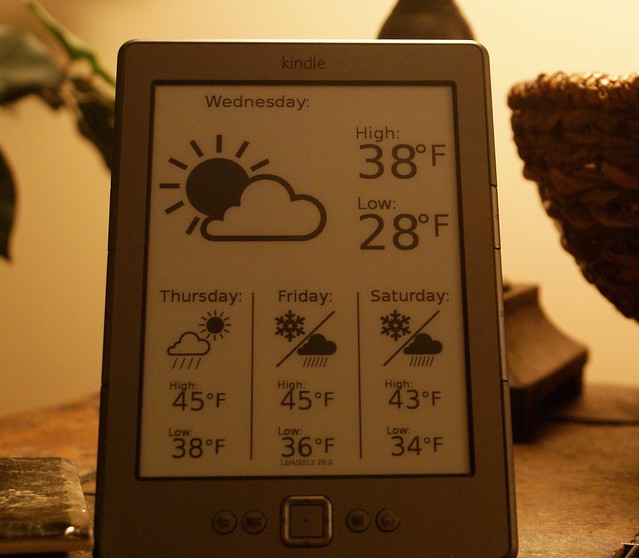
I also noticed the DAY_ONE day was being cut off when the actual day of the week was being inserted so I had to play around a bit with the x axis placement. I also opted for a left anchor as well which pulled the day over a little. I might play around and move it some more if it bothers me, but for now I'm happy with the placement.
Anyway, as you an see, we now have all the days of the week listed. Here's tomorrow's forecast as of 8pm tonight!

Original post with tutorial:Kindle Weather Display


File downloads:
Kindle Weather Display Github Repository
Or if you prefer, download directly from dropbox

It was pretty warm out (about 60 degrees) so I ate lunch outdoors, despite the gloominess.

Today is day two of an awesome weekend with Adam and Comfort. So lots of tasty food (starting with cinnamon roll pancakes), epics walks in the nice weather, and random videos on the internet to be had!
Adam and Comfort's friends Corrine and Eric came over in the afternoon. We had a good time watching a bad movie (made more awesome with Riff Trax) and eating tasty food.

I'm sad to see the weekend end.

Adam and Comfort are over for the weekend. That means tasty food, great company, random movies and more. But first a toy show!

The event was in a small school near our house. We met up with Jeff and Dan to check everything out.
After the show we headed back to our place for lunch and gaming. Jeff brought over some Wii games to play.
Adam and Comfort arrived in the afternoon. We had a nice evening watching random clips, a weird movie, and a few tv shows.

We also made sure to have a belated birthday celebration for Comfort, since her birthday was last week. We couldn't find and birthday hats so we just used a mask instead. all in all fun Saturday.